## 1.
**[Preview and Design](#preview)**
## 2.
[**How to create**](#creation)
## 3.
[**How to translate**](/site-configuration/edit-translations "Edit translations")
---
## Preview

## Information architecture
Allows to add a button with external or internal link. Link can be opened in a new or the same tab in browser.
## Design
Can use any of the Veolia colors. Can be added to a text pargraph with left, center or right alignment. Width of the button is flexible, it is based on the text length.
## Typical usage and example
To be used for: link to related node inside text, link to a webform.
See an examples on:
---
## How to create it
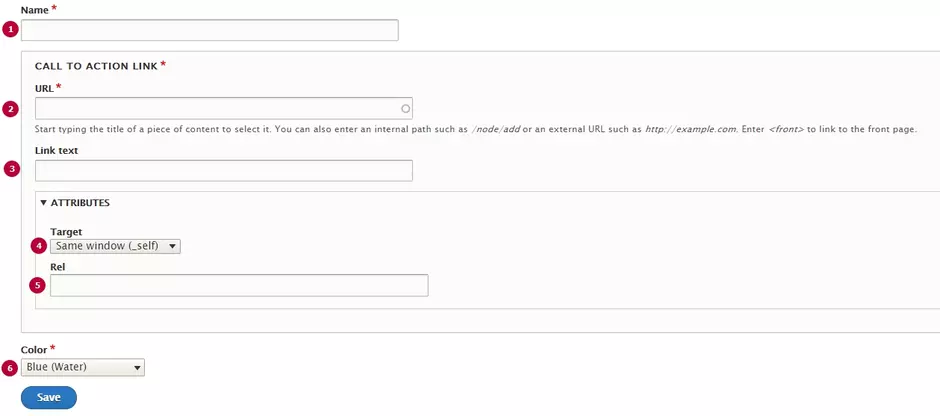
| Field | Description |
|---|---|
| 1 - Name | Used only in the backoffice |
| 2 - URL | Link to a page. Can be external or internal |
| 3 - Link text | Label for the button. Node's title will be displayed as label, if no link text is set for internal link |
| 4 - Target | Link will be opened in the same tab if 'Same window' target is set (only for internal links). In other case, link will be opened in the new window) |
| 5 - Rel | Rel attribute of the link. Valuable only for SEO, no impact for display. |
| 6 - Color | Colour of the button. Can use any of Veolia color |