## 1.
**[Preview and Design](#preview)**
## 2.
[**How to create**](#creation)
## 3.
[**How to translate**](/site-configuration/edit-translations "Edit translations")
---
## Preview
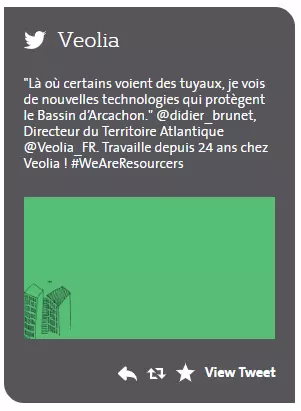
Tweet push media example preview
## Information architecture
Tweet push medias displays the latest post from set Twitter's account
Can be added to a **[Grid paragraph](/components/grid-component "Grid component")** (Homepage as well)
## Design
Twitter icon and account's name displays on the top of the media
The latest twit is displaying with image(if it added to the twit)
Reply, Re-twit, Add to favorite and View Tweet buttons are displaying in the right bottom corner of the media
---
## How to create it
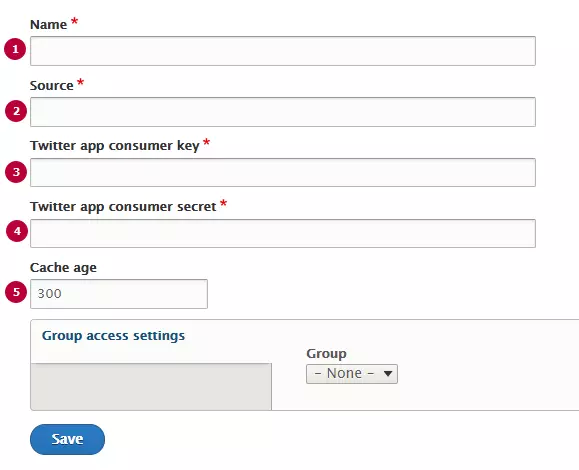
| Field | Description |
|---|---|
| 1 - Name | Used only in the backoffice, not visible for the end users |
| 2 - Source | Link to source twitter account |
| 3 - Twitter app consumer key | Twitter Application ID. Should be created with twitter(see detailed instructions below) |
| 4 - Twitter app consumer secret | Api secret key Twitter Application ID. Should be created with twitter(see detailed instructions below) |
| 5 - Cache age | Timeout between posts updating. Set in seconds, default value is 300s (5 minutes) |
[DOCX
How to create social networks application (977.61 KB)
](/sites/g/files/dvc2391/files/document/2019/02/How%20to%20create%20social%20networks%20application.docx)