## Better understand digital accessibility


Digital accessibility means making access to digital information and functionalities possible for people with disabilities. This applies to: all content, all platforms, and all functionalities.

**Who is digital accessibility for?**

- People with visual or hearing impairments.
- People with motor impairments.
- People with a mental disability, psychological or cognitive disorder.
- People with multiple disabilities.


**A fundamental right**

Accessibility is a fundamental right. It is an essential tool in the fight against discrimination, a guarantee of independence, and a means to promote inclusion in society. We all have a part to play!


## A legal framework that is being reinforced


**France and Italy:** New laws establishing an obligation. Public services and companies exceeding certain revenue thresholds (€250M in France, €500M in Italy) must make all their digital services accessible and guarantee transparency.


**Europe:** The EAA mandates full accessibility for public services and certain sectors (transportation, e-commerce, etc.) under penalty of significant sanctions.


**Rest of the world:** Legislation such as the ADA in the United States also requires digital services to be made accessible, under penalty of legal action and heavy damages.


## Recommended process for creating your accessibility page

Collaborating with your web team and accessibility experts is essential for ensuring that your accessibility page is accurate and effective. Working together helps create a more inclusive digital experience for all users.

Please find below the recommended process for implementation:

1. Download and review the appropriate **template** ([English](#EN)[ ](https://www.sf.userguide.veolia.com/media/9166)or [French](#FR) version).
2. Review the provided **video tutorial** and **written guide** for step-by-step instructions.
3. **Customize the content** to match your website's context and **verify** accuracy with your team.
4. **Publish** the accessibility page and implement it in your website's [**footer menu**](#footer).


   ![](/sites/g/files/dvc2391/files/styles/crop_freeform/public/image/2024/08/HP%20BG%20-%20grey%20very%20pale.png.webp?itok=OY0Zt4pI)   


## <a id="EN"></a>How to create your accessibility page


   ![create accessibilty page tuto](/sites/g/files/dvc2391/files/styles/default/public/image/2025/07/202504171458%20%2828%29%20%281%29.gif?itok=T_u84xkN)   


### English accessibility page template

    [Click here to download ](https://docs.google.com/document/d/1z8UC1G3pgnLN7Ec7LaBee_eh1Kh7mF4d6sK_ircrl5I/edit?usp=sharing)


### Modèle de page d'accessibilité en français

    [Cliquez ici pour télécharger](https://drive.google.com/file/d/1e9geMjw8d1xg8Rz-zr_A2xHu_9NoxEUD/view)


<a id="#FR"></a>


Go to Content, then Add content, and select Page.

Enter a title and complete the hero banner with your introductory sentence.

Create a **container** and choose the **Text component**. **Paste the template inside** the text field. **Remove the style** by clicking the ***Tx*** **icon**. Adjust the text spacing, **replace** the highlighted yellow info with your **site name**, **contact form**, and **reply time**. Make sure the URLs in the text are properly linked and clickable.

Finally, **publish** the page.


## <a class="ck-anchor" id="footer"></a>

## How to add the page to the footer menu


   ![footer menu](/sites/g/files/dvc2391/files/styles/default/public/image/2025/07/202507171336.gif?itok=WXd6xnpG)   


First, go to **Structure**, then Menu, and Footer.

Click on Add link.

Enter the **menu title** and paste the link using the correct **node** to redirect to your page. Click **Save**.

Make sure to check the "**Enabled**" box so the menu appears in the footer. Click **Save** again to confirm.

Finally, scroll down to the bottom of your landing page to check that the menu link is now visible in the footer.


    ![BG Green](/sites/g/files/dvc2391/files/styles/crop_freeform/public/image/2025/02/BG%20Green.jpg.webp?itok=njHyYBvK)   


## **Checklist and best practices**


###  Text Structure


**Today, 67.7% of screen reader users navigate from heading to heading to browse a webpage.**

- **✅ DO:** Use a logical and consistent heading hierarchy (H1 to H6) that forms a "table of contents". Manage spacing and structure quotes using your text editor's built-in features. Avoid unmarked language changes, except for integrated foreign words (e.g., newsletter).
- **❌ DON'T:** Never skip heading levels (e.g., jumping directly from an H2 to an H4). Do not use heading levels simply to make text larger. Do not use multiple line breaks (empty paragraphs) to force visual spacing.
- **🛠️ TOOLS:** Install the HeadingsMap browser extension (highlights heading errors in red) and the Ideance Bookmarklets (to spot multiple line breaks and empty tags).

   ![Arborescence des Headers](/sites/g/files/dvc2391/files/styles/default/public/image/2026/09/Screenshot%202026-09-23%2015.25.39.png.webp?itok=AATVOeqd)   


👉 Outil [HeadingsMap](https://chromewebstore.google.com/detail/headingsmap/flbjommegcjonpdmenkdiocclhjacmbi)  
👉 Bookmarklets Ideance "[Retour à la ligne consécutif](https://codepen.io/ideance/pen/wBMEvJb)" et “[Balises vides](https://codepen.io/ideance/pen/bNEjPRX)”


###  Images


**The text alternative is read by screen readers to convey information to people who are blind or visually impaired.**

- ✅ **DO (Decorative images):** The text alternative must remain empty. In Drupal, you must check the "Decorative image" box so that this information is ignored by screen readers.
- ✅ **DO (Informative images):** Provide a text alternative that objectively describes the image in a single sentence.
- ✅ **DO (Complex images):** When an image (e.g., a diagram) conveys a lot of information, include "(see detailed description below)" in the text alternative. Then, add an "Accordion" component (collapsible panel) below the image containing the detailed text.
- ❌ **DON'T:** The text alternative must NEVER contain a string of keywords for SEO, the image file name, copyright information, or the exact same text as the title of the adjacent content.

   ![Boutton-image décorative](/sites/g/files/dvc2391/files/styles/default/public/image/2026/09/Screenshot%202026-09-23%2015.29.06.png.webp?itok=1ARJyZZ7)   


###  Lists, Tables and Links


- **✅ DO (Lists):** Use numbered lists only if the order is actually important (e.g., a recipe). Use bulleted lists if the order does not matter. Use "Shift + Enter" to add spacing between items.
- **❌ DON'T (Lists):** Manually add a dash or a number at the beginning of each line.
- ✅ **DO (Tables):** Indicate the position of the headers (1st column and/or 1st row) using your editor; they will then appear with a gray background.
- ✅ **DO (Links):** Link labels must be explicit. Select the entire phrase that describes the action (rather than just the word "here"). Visually differentiate links in the text by adding a distinctive element, such as an underline.
- **❌ DON'T (Links):** Labels like "Find out more", "Read more", or "Click here".

   ![Boutton - en tête tableau](/sites/g/files/dvc2391/files/styles/default/public/image/2026/09/Screenshot%202026-09-23%2015.33.06.png.webp?itok=yftkrMKb)   


###  Videos and Audio Content


- ✅ **DO:** Every video must have synchronized, punctuated, and sufficiently contrasted captions (or subtitles).
- ✅ **DO:** If you use auto-generated captions (YouTube or Lumapps), manually correct transcription errors and punctuation.
- **✅ DO:** All video and audio content must have a text transcript. Place it directly below the video in a collapsible section (Accordion).
- **🛠️ TOOLS:** Use the COMM-AI video Transcription tool.

   ![Lien- accessibilité vidéo](/sites/g/files/dvc2391/files/styles/default/public/image/2026/09/Screenshot%202026-09-23%2015.34.58.png.webp?itok=Ez3aE565)   


###  Colors and Contrast


**To ensure your content is readable by visually impaired and color-blind individuals, you must use color combinations with sufficient contrast.**

- **Golden rule:** It is necessary to achieve a minimum contrast ratio of 4.5:1 (WCAG AA Standard).
- **Scope:** This applies to all web text, documents (PDF, Word, etc.), emails, captions/subtitles, and especially text embedded within an image. (Exceptions: logos, labels, and decorative icons).
- **🛠️ TOOLS:** Use the online tool app.contrast-finder.org to check your ratios, install the "Contrast Checker" Bookmarklet, and discover the "EditoriA11y" plugin (coming soon to Drupal).

  
👉 Test on [app.contrast-finder.org](https://app.contrast-finder.org/)  
👉 Install the [Contrast Checker Bookmarklet](https://webaim.org/resources/contrastchecker/bookmarklet)  
👉 Discover the EditoriA11y plugin (coming soon)


## WCAG AA-Compliant Color Combinations

This list displays only color combinations that meet **WCAG AA requirements for normal text.**  
The minimum required contrast ratio is **4.5:1**. The background color is shown on the left, and the text or icon color is shown on the right.  
Use it to **quickly verify contrast ratios** (like WCAG AA) and **guarantee your content is readable** for all users, including those with visual impairments.


## WCAG AA Colors

 Graphic Charter 2024 


 ### Usage Context (Backgrounds)

- all\_inclusive All colors
- light\_mode Light Backgrounds
- dark\_mode Dark Backgrounds


 ### Background Selector


      search  

 WCAG AA (≥ 4.5:1) grid\_view reorder 

 brightness\_4 

  ## All combinations

Select a background color from the menu to start.


0 combination(s) found


  | Text Color | Preview | Ratio | Compliance |
|---|---|---|---|


  :root {
    /* Main Brand Variables */
    --v-brand-red: #EE0000;
    --v-brand-navy: #002D62;
    --v-brand-green: #00613B;
    
    /* Light Theme Variables */
    --bg-app: #F4F5F8;
    --bg-panel: #FFFFFF;
    --bg-hover: #F2F2F2;
    --border-color: #E0E4EC;
    --text-main: #191919;
    --text-muted: #666666;
    --shadow-sm: 0 2px 4px rgba(0,0,0,0.04);
    --shadow-md: 0 4px 12px rgba(0,0,0,0.08);
  }

  .v-wcag-dashboard[data-theme="dark"] {
    --bg-app: #121418;
    --bg-panel: #1C1F26;
    --bg-hover: #2D323E;
    --border-color: #2D323E;
    --text-main: #F2F2F2;
    --text-muted: #9897A8;
  }

  .v-wcag-dashboard {
    display: flex;
    height: 90vh;
    min-height: 600px;
    font-family: 'Noto Sans', sans-serif;
    background: var(--bg-app);
    color: var(--text-main);
    border-radius: 12px;
    overflow: hidden;
    border: 1px solid var(--border-color);
  }

  /* --- SIDEBAR --- */
  .v-sidebar {
    width: 280px;
    background: var(--bg-panel);
    border-right: 1px solid var(--border-color);
    display: flex;
    flex-direction: column;
    flex-shrink: 0;
  }

  .v-brand-header {
    padding: 20px;
    display: flex;
    gap: 12px;
    align-items: center;
    border-bottom: 1px solid var(--border-color);
  }

  .v-accent-line {
    width: 4px;
    height: 32px;
    background: var(--v-brand-red);
    border-radius: 4px;
  }

  .v-logo-title { margin: 0; font-size: 1rem; font-weight: 700; }
  .v-version { font-size: 0.75rem; color: var(--text-muted); }

  .v-sidebar-scroll {
    overflow-y: auto;
    flex: 1;
    padding: 16px 0;
  }

  .v-nav-section { margin-bottom: 24px; padding: 0 16px; }
  .v-nav-title { font-size: 0.75rem; text-transform: uppercase; letter-spacing: 1px; color: var(--text-muted); margin-bottom: 12px; font-weight: 700; }
  .v-nav-list { list-style: none; padding: 0; margin: 0; display: flex; flex-direction: column; gap: 4px; }
  
  .v-nav-btn {
    width: 100%;
    display: flex;
    align-items: center;
    gap: 10px;
    padding: 8px 12px;
    border: none;
    background: transparent;
    color: var(--text-main);
    font-size: 0.85rem;
    font-weight: 500;
    border-radius: 6px;
    cursor: pointer;
    text-align: left;
    transition: background 0.2s;
  }

  .v-nav-btn:hover { background: var(--bg-hover); }
  .v-nav-btn.active { background: var(--v-brand-navy); color: #FFF; }
  .v-nav-btn.active .material-icons-outlined { color: #FFF; }

  /* Accordion styles for Color Families */
  .v-family-group { margin-bottom: 8px; }
  .v-family-header {
    display: flex;
    align-items: center;
    justify-content: space-between;
    width: 100%;
    padding: 8px 12px;
    background: var(--bg-hover);
    border: none;
    border-radius: 6px;
    color: var(--text-main);
    font-weight: 600;
    font-size: 0.8rem;
    cursor: pointer;
  }
  .v-family-list {
    list-style: none; padding: 4px 0 0 12px; margin: 0; display: none;
  }
  .v-family-list.open { display: block; }
  
  .v-color-item {
    display: flex;
    align-items: center;
    gap: 8px;
    padding: 6px 8px;
    border-radius: 6px;
    cursor: pointer;
    font-size: 0.8rem;
    border: 1px solid transparent;
  }
  .v-color-item:hover { background: var(--bg-hover); }
  .v-color-item.selected { border-color: var(--v-brand-navy); background: rgba(0, 45, 98, 0.05); font-weight: 600; }
  .v-swatch-mini { width: 16px; height: 16px; border-radius: 50%; border: 1px solid rgba(128,128,128,0.3); }

  /* --- MAIN CONTENT --- */
  .v-main-content {
    flex: 1;
    display: flex;
    flex-direction: column;
    overflow: hidden;
  }

  .v-toolbar {
    padding: 16px 24px;
    background: var(--bg-panel);
    border-bottom: 1px solid var(--border-color);
    display: flex;
    justify-content: space-between;
    align-items: center;
    gap: 16px;
  }

  .v-search-wrapper {
    position: relative;
    flex: 1;
    max-width: 400px;
  }
  .v-search-wrapper input {
    width: 100%;
    padding: 8px 16px 8px 36px;
    border-radius: 20px;
    border: 1px solid var(--border-color);
    background: var(--bg-app);
    color: var(--text-main);
    outline: none;
  }
  .v-search-wrapper .material-icons-outlined {
    position: absolute;
    left: 10px; top: 50%; transform: translateY(-50%);
    color: var(--text-muted); font-size: 18px;
  }

  .v-toolbar-actions { display: flex; align-items: center; gap: 16px; }

  .v-aa-badge {
    background: rgba(120, 190, 33, 0.15);
    color: #00613B;
    border: 1px solid #78BE21;
    padding: 4px 12px;
    border-radius: 18px;
    font-size: 0.8rem;
    font-weight: 700;
  }

  .v-view-switcher { display: flex; gap: 4px; }
  .v-icon-btn { padding: 6px; border: 1px solid transparent; background: transparent; border-radius: 6px; cursor: pointer; color: var(--text-muted); display:flex; align-items:center; }
  .v-icon-btn:hover { background: var(--bg-hover); }
  .v-icon-btn.active { background: var(--bg-hover); color: var(--text-main); border-color: var(--border-color); }

  .v-results-header { padding: 24px; display: flex; justify-content: space-between; align-items: flex-end; }
  .v-results-header h2 { margin: 0 0 4px 0; font-size: 1.5rem; }
  .v-text-muted { margin: 0; color: var(--text-muted); font-size: 0.85rem; }
  .v-stats-badge { background: var(--bg-panel); border: 1px solid var(--border-color); color: var(--text-main); padding: 6px 12px; border-radius: 20px; font-weight: 600; font-size: 0.85rem; }

  .v-views-container { flex: 1; overflow-y: auto; padding: 0 24px 24px 24px; }

  /* GRID */
  .v-grid-layout { display: grid; grid-template-columns: repeat(auto-fill, minmax(240px, 1fr)); gap: 16px; }
  .v-card { background: var(--bg-panel); border-radius: 10px; border: 1px solid var(--border-color); overflow: hidden; display: flex; flex-direction: column; transition: transform 0.2s ease, box-shadow 0.2s ease; }
  .v-card:hover { transform: translateY(-3px); box-shadow: var(--shadow-md); border-color: var(--border-color); }
  .v-card-preview { padding: 20px; height: 100px; display: flex; align-items: center; justify-content: center; font-size: 1.2rem; font-weight: 700; text-align: center; position: relative; }
  .v-card-badge { position: absolute; top: 10px; right: 10px; padding: 3px 6px; border-radius: 4px; font-size: 0.65rem; font-weight: 700; background: rgba(0,0,0,0.3); color: #FFF; text-transform: uppercase; }
  .v-card-body { padding: 16px; border-top: 1px solid var(--border-color); }
  .v-card-meta { display: flex; justify-content: space-between; align-items: center; }
  .v-ratio { font-weight: 800; font-size: 1.1rem; font-family: monospace; color: var(--text-main); }

  /* TABLE */
  .v-table-layout { background: var(--bg-panel); border-radius: 10px; border: 1px solid var(--border-color); overflow: hidden; }
  .v-table-layout table { width: 100%; border-collapse: collapse; text-align: left; font-size: 0.85rem; }
  .v-table-layout th { background: var(--bg-app); padding: 12px 16px; color: var(--text-muted); font-weight: 600; border-bottom: 1px solid var(--border-color); }
  .v-table-layout td { padding: 12px 16px; border-bottom: 1px solid var(--border-color); vertical-align: middle; }
  .v-table-preview-pill { padding: 4px 12px; border-radius: 4px; font-weight: 600; display: inline-block; }
 
(function() {
  const CONTRAST_THRESHOLD_AA = 4.5;

  // Dictionary aligned with Graphic Charter names
  const colorFamilies = {
    reds: [
      { hex: "#EE0000", name: "Red" },
      { hex: "#ED694B", name: "Pale Red" }
    ],
    oranges: [
      { hex: "#FF6900", name: "Orange" },
      { hex: "#FF8A00", name: "Vivid Orange" },
      { hex: "#FFAC00", name: "Light Orange" },
      { hex: "#FDC686", name: "Apricot" },
      { hex: "#FFDCB3", name: "Very Light Orange" }
    ],
    yellows: [
      { hex: "#E8BF00", name: "Dark Yellow" },
      { hex: "#FFD616", name: "Yellow" },
      { hex: "#F5D955", name: "Golden Yellow" },
      { hex: "#FFED99", name: "Pale Yellow" },
      { hex: "#FFF5C5", name: "Very Light Yellow" }
    ],
    greens: [
      { hex: "#00613B", name: "Dark Green" },
      { hex: "#438D42", name: "Forest Green" },
      { hex: "#78BE21", name: "Apple Green" },
      { hex: "#C7D64F", name: "Light Green" },
      { hex: "#D9EDC0", name: "Very Light Green" }
    ],
    turquoises: [
      { hex: "#098192", name: "Dark Turquoise" },
      { hex: "#05C3DD", name: "Turquoise" },
      { hex: "#76DAE8", name: "Light Turquoise" },
      { hex: "#99E1EF", name: "Pale Turquoise" },
      { hex: "#D7FAFF", name: "Very Light Turquoise" }
    ],
    blues: [
      { hex: "#002D62", name: "Navy" },
      { hex: "#0679CC", name: "Vivid Blue" },
      { hex: "#ADCCF0", name: "Light Blue" },
      { hex: "#CCE4FF", name: "Pale Blue" },
      { hex: "#EBF4FF", name: "Very Light Blue" }
    ],
    purples: [
      { hex: "#501658", name: "Dark Purple" },
      { hex: "#772583", name: "Purple" },
      { hex: "#9E4AAB", name: "Light Purple" },
      { hex: "#C768CF", name: "Pale Purple" },
      { hex: "#FFD0F2", name: "Very Light Purple" }
    ],
    greyscales: [
      { hex: "#000000", name: "Black" },
      { hex: "#191919", name: "Black 90" },
      { hex: "#333333", name: "Black 80" },
      { hex: "#4C4C4C", name: "Black 70" },
      { hex: "#666666", name: "Black 60" },
      { hex: "#808080", name: "Black 50" },
      { hex: "#999999", name: "Black 40" },
      { hex: "#B2B2B2", name: "Black 30" },
      { hex: "#CCCCCC", name: "Black 20" },
      { hex: "#E5E5E5", name: "Black 10" },
      { hex: "#F2F2F2", name: "Black 0" },
      { hex: "#FFFFFF", name: "White" }
    ],
    neutrals: [
      { hex: "#1C1C1F", name: "Neutral 90" },
      { hex: "#55555A", name: "Grey (Pantone)" },
      { hex: "#75748B", name: "Neutral 80" },
      { hex: "#9897A8", name: "Neutral 70" },
      { hex: "#C8C8DA", name: "Neutral 60" },
      { hex: "#D5D3E3", name: "Neutral 50" },
      { hex: "#E0DDEE", name: "Neutral 40" },
      { hex: "#E9E6F4", name: "Neutral 30" },
      { hex: "#F2F1F9", name: "Neutral 20" },
      { hex: "#FCFCFC", name: "Neutral" }
    ]
  };

  const allColorsObj = {};
  let allColorsHex = [];
  
  // Flatten families into a dictionary for quick lookup
  Object.values(colorFamilies).forEach(family => {
    family.forEach(color => {
      if(!allColorsObj[color.hex.toUpperCase()]) {
          allColorsObj[color.hex.toUpperCase()] = color.name;
          allColorsHex.push(color.hex.toUpperCase());
      }
    });
  });

  // State
  let state = {
    activeBg: null, 
    searchQuery: '',
    contextFilter: 'all' // all, light, dark
  };

  // WCAG Calculation Utilities
  function hexToRgb(hex) {
    return { r: parseInt(hex.substring(1, 3), 16), g: parseInt(hex.substring(3, 5), 16), b: parseInt(hex.substring(5, 7), 16) };
  }
  function relativeLuminance(hex) {
    const rgb = hexToRgb(hex);
    const channels = [rgb.r, rgb.g, rgb.b].map(val => {
      val /= 255;
      return val <= 0.04045 ? val / 12.92 : Math.pow((val + 0.055) / 1.055, 2.4);
    });
    return 0.2126 * channels[0] + 0.7152 * channels[1] + 0.0722 * channels[2];
  }
  function contrastRatio(bg, fg) {
    const l1 = relativeLuminance(bg);
    const l2 = relativeLuminance(fg);
    return (Math.max(l1, l2) + 0.05) / (Math.min(l1, l2) + 0.05);
  }
  function isLight(hex) {
    return relativeLuminance(hex) > 0.5;
  }

  function initializeTool(tool) {
    if (tool.dataset.wcagInitialized === 'true') return;
    tool.dataset.wcagInitialized = 'true';

    // Elements
    const gridEl = tool.querySelector('#viewGrid');
    const tableBodyEl = tool.querySelector('#tableBody');
    const searchInput = tool.querySelector('#globalSearch');
    const themeToggleBtn = tool.querySelector('#themeToggle');
    const resultsTitle = tool.querySelector('#resultsTitle');
    const resultsMeta = tool.querySelector('#resultsMeta');
    const resultsCount = tool.querySelector('#resultsCount');
    const containerAccordion = tool.querySelector('#colorFamiliesAccordion');

    function buildSidebar() {
      const categories = [
        { id: 'reds', label: 'Reds' },
        { id: 'oranges', label: 'Oranges' },
        { id: 'yellows', label: 'Yellows' },
        { id: 'greens', label: 'Greens' },
        { id: 'turquoises', label: 'Turquoises' },
        { id: 'blues', label: 'Blues' },
        { id: 'purples', label: 'Purples' },
        { id: 'greyscales', label: 'Greyscales' },
        { id: 'neutrals', label: 'Neutrals & Backgrounds' }
      ];

      categories.forEach(cat => {
        const group = document.createElement('div');
        group.className = 'v-family-group';
        
        const header = document.createElement('button');
        header.className = 'v-family-header';
        header.innerHTML = `<span>${cat.label} <span class="material-icons-outlined" style="font-size:16px">expand_more`;
        
        const list = document.createElement('ul');
        list.className = 'v-family-list';
        
        colorFamilies[cat.id].forEach(color => {
          const li = document.createElement('li');
          li.className = 'v-color-item';
          li.dataset.hex = color.hex.toUpperCase();
          li.innerHTML = `<div class="v-swatch-mini" style="background:${color.hex}">

 ${color.name}`; li.addEventListener('click', () =&gt; { tool.querySelectorAll('.v-color-item').forEach(el =&gt; el.classList.remove('selected')); li.classList.add('selected'); tool.querySelectorAll('#contextFilters .v-nav-btn').forEach(b =&gt; b.classList.remove('active')); state.activeBg = color.hex.toUpperCase(); renderResults(); }); list.appendChild(li); }); header.addEventListener('click', () =&gt; { list.classList.toggle('open'); header.querySelector('.material-icons-outlined').textContent = list.classList.contains('open') ? 'expand_less' : 'expand_more'; }); // Default Open for Blue &amp; Greyscales if(cat.id === 'blues' || cat.id === 'greyscales') list.classList.add('open'); group.appendChild(header); group.appendChild(list); containerAccordion.appendChild(group); }); } function attachListeners() { // Context Filters (All, Light backgrounds, Dark backgrounds) tool.querySelectorAll('#contextFilters .v-nav-btn').forEach(btn =&gt; { btn.addEventListener('click', (e) =&gt; { tool.querySelectorAll('#contextFilters .v-nav-btn').forEach(b =&gt; b.classList.remove('active')); btn.classList.add('active'); tool.querySelectorAll('.v-color-item').forEach(el =&gt; el.classList.remove('selected')); state.activeBg = null; state.contextFilter = btn.dataset.filter; renderResults(); }); }); // Search Input searchInput.addEventListener('input', (e) =&gt; { state.searchQuery = e.target.value.toLowerCase().trim(); renderResults(); }); // View Switcher tool.querySelectorAll('.v-icon-btn[data-view]').forEach(btn =&gt; { btn.addEventListener('click', () =&gt; { tool.querySelectorAll('.v-icon-btn[data-view]').forEach(b =&gt; b.classList.remove('active')); btn.classList.add('active'); const view = btn.dataset.view; tool.querySelector('#viewGrid').style.display = view === 'grid' ? 'grid' : 'none'; tool.querySelector('#viewTable').style.display = view === 'table' ? 'block' : 'none'; }); }); // Theme Toggle if(themeToggleBtn) { themeToggleBtn.addEventListener('click', () =&gt; { if (tool.getAttribute('data-theme') === 'dark') { tool.removeAttribute('data-theme'); } else { tool.setAttribute('data-theme', 'dark'); } }); } } function renderResults() { let validPairs = []; // Determine target backgrounds let bgsToProcess = allColorsHex; if (state.activeBg) { bgsToProcess = [state.activeBg]; resultsTitle.textContent = `Background: ${allColorsObj[state.activeBg]} (${state.activeBg})`; resultsMeta.textContent = `Text colors compatible with this background.`; } else { if (state.contextFilter === 'light') { bgsToProcess = allColorsHex.filter(hex =&gt; isLight(hex)); resultsTitle.textContent = `Light Backgrounds`; } else if (state.contextFilter === 'dark') { bgsToProcess = allColorsHex.filter(hex =&gt; !isLight(hex)); resultsTitle.textContent = `Dark Backgrounds`; } else { resultsTitle.textContent = `All combinations`; } resultsMeta.textContent = `Explore text colors depending on background.`; } // Process combinations bgsToProcess.forEach(bg =&gt; { allColorsHex.forEach(fg =&gt; { const ratio = contrastRatio(bg, fg); if (ratio &gt;= CONTRAST_THRESHOLD_AA) { const fgName = allColorsObj[fg]; const bgName = allColorsObj[bg]; if (state.searchQuery === '' || fg.toLowerCase().includes(state.searchQuery) || fgName.toLowerCase().includes(state.searchQuery) || bg.toLowerCase().includes(state.searchQuery) || bgName.toLowerCase().includes(state.searchQuery)) { validPairs.push({ bg, fg, ratio, fgName, bgName }); } } }); }); // Sort Descending validPairs.sort((a, b) =&gt; { if (a.bg === b.bg) return b.ratio - a.ratio; return b.ratio - a.ratio; }); // Update Counter resultsCount.textContent = `${validPairs.length} combination(s) found`; // Render Grid &amp; Table gridEl.innerHTML = ''; tableBodyEl.innerHTML = ''; if (validPairs.length === 0) { gridEl.innerHTML = `No color meets the criteria.

`; tableBodyEl.innerHTML = `| No results |
|---|
`; return; } validPairs.forEach(pair =&gt; { const isAAA = pair.ratio &gt;= 7.0; // GRID ITEM const card = document.createElement('div'); card.className = 'v-card'; card.innerHTML = `  ${isAAA ? 'WCAG AAA' : 'WCAG AA'}Example Text

Normal readability


 ${state.activeBg ? 'Text color' : 'Bg: ' + pair.bgName + ' | Text'} 

${pair.fgName}

${pair.fg}


${pair.ratio.toFixed(2)}


 `; gridEl.appendChild(card); // TABLE ROW const tr = document.createElement('tr'); tr.innerHTML = ` | ${pair.fgName}  ${pair.fg}  | Visual Preview  | ${pair.ratio.toFixed(2)}:1  | check\_circle Compliant  `; tableBodyEl.appendChild(tr); }); } buildSidebar(); attachListeners(); renderResults(); } function init(context) { const scope = context || document; scope.querySelectorAll('[data-v-wcag-tool]').forEach(tool =&gt; initializeTool(tool)); } if (typeof Drupal !== 'undefined' &amp;&amp; Drupal.behaviors) { Drupal.behaviors.vWcagTool = { attach: function (context) { init(context); } }; } else { document.addEventListener('DOMContentLoaded', () =&gt; init(document)); } })(); 


##   
Handy accessibility tips  


### Text-to-Speech Accessibility Guide

Text-to-Speech (TTS) is a built-in accessibility feature that reads digital text aloud. It ensures that everyone, including users with visual impairments or reading difficulties, can access our online content without barriers. Select your operating system below to find step-by-step instructions on how to enable and use these native audio reading tools.

 
        .veo-tabs-nav {
          display: flex;
          border-bottom: 2px solid #E5E5E5;
          margin-bottom: 2rem;
          margin-top: 2rem;
          gap: 0.5rem;
          flex-wrap: wrap;
        }
        .veo-tab-btn {
          background: transparent;
          border: none;
          border-bottom: 4px solid transparent;
          padding: 0.75rem 1.5rem;
          font-family: inherit;
          font-size: 1.125rem;
          font-weight: 700;
          color: #4C4C4C;
          cursor: pointer;
          transition: all 0.2s ease-in-out;
        }
        .veo-tab-btn:hover {
          color: #00613B;
          background-color: #F2F2F2;
        }
        .veo-tab-btn.active {
          color: #00613B;
          border-bottom-color: #00613B;
        }
        .veo-tab-content {
          display: none;
          animation: fadeVeo 0.4s ease;
        }
        .veo-tab-content.active {
          display: block;
        }
        .veo-tip-box {
          background-color: #F2F1F9;
          border-left: 4px solid #00613B;
          padding: 1.5rem;
          margin-top: 1.5rem;
          border-radius: 0 4px 4px 0;
        }
        .veo-tip-box p {
          margin: 0 !important;
        }
        @keyframes fadeVeo {
          from { opacity: 0; transform: translateY(4px); }
          to { opacity: 1; transform: translateY(0); }
        }
       Windows Mac Chromebook 

### Enable Narrator on Windows

Narrator reads aloud the text on your screen and describes events, such as notifications or appointments.

1. Open **Settings** (keyboard shortcut: `Windows + i`).
2. In the left menu, select **Accessibility**.
3. Under the "Vision" section, click on **Narrator**.
4. Turn on the **Narrator** toggle switch.
 
**💡 Tip:** The keyboard shortcut `Windows + Ctrl + Enter` lets you turn Narrator on or off at any time.


### Enable "Spoken Content" on Mac

macOS offers a targeted feature that only reads the text you select.

1. Click the **Apple menu** in the top left corner, then choose **System Settings**.
2. In the left sidebar, click on **Accessibility**.
3. Under the "Vision" section, click on **Spoken Content**.
4. Turn on the **Speak selection** toggle switch.
 
**💡 Tip:** Highlight any text and press `Option + Esc` to start the voice reading.


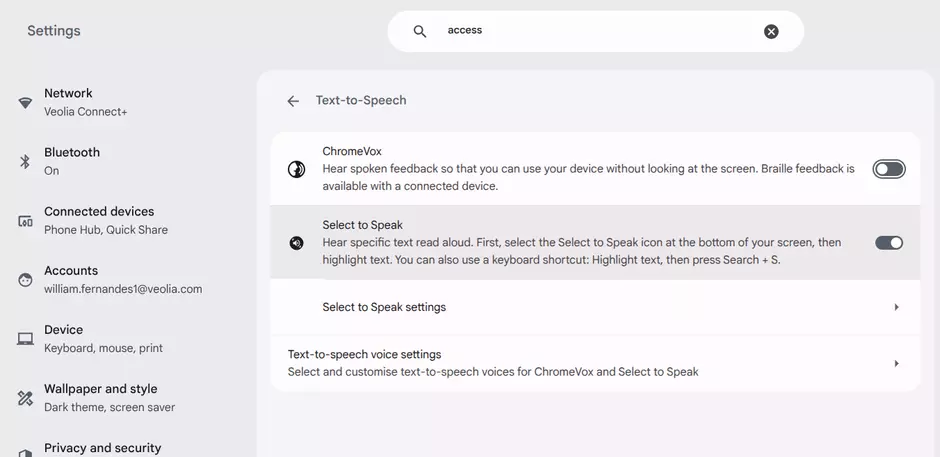
### Enable "Select-to-speak" on Chromebook

ChromeOS has a similar tool that reads a specific text area aloud.

1. Click the time in the bottom right corner of your screen, then click the **Settings** icon (the gear).
2. In the left menu, select **Accessibility**.
3. Click on **Manage accessibility features**.
4. Under the "Text-to-Speech" section, turn on the **Select-to-speak** option.
 
**💡 Tip:** To use it, press and hold the `Search` key and click a line of text, or drag your pointer over an area of the screen.


        function openVeoTab(evt, osName) {
          var i, tabcontent, tablinks;
          tabcontent = document.getElementsByClassName("veo-tab-content");
          for (i = 0; i < tabcontent.length; i++) {
            tabcontent[i].classList.remove("active");
          }
          tablinks = document.getElementsByClassName("veo-tab-btn");
          for (i = 0; i < tablinks.length; i++) {
            tablinks[i].classList.remove("active");
          }
          document.getElementById(osName).classList.add("active");
          evt.currentTarget.classList.add("active");
        }


   ![Text to audio - settings](/sites/g/files/dvc2391/files/styles/media/public/image/2026/09/Screenshot%202026-09-22%2012.43.22.png.webp?itok=QMcb4vk2)   


##  Explore more configuration options 

 [   ![Basic settings picto in dark green ](/sites/g/files/dvc2391/files/styles/media/public/image/2025/04/DATA.jpg.webp?itok=_xepKVk0)   ](/site-configuration/basic-site-settings)[Basic settings ](/site-configuration/basic-site-settings)

 

###       [Basic settings ](/site-configuration/basic-site-settings) 


 [   ![navigation settings picto dark green](/sites/g/files/dvc2391/files/styles/media/public/image/2025/04/DATA%20%283%29.jpg.webp?itok=T62AwVR5)   ](/site-configuration/navigation)[Navigation settings ](/site-configuration/navigation)
 

###       [Navigation settings ](/site-configuration/navigation) 


 [   ![Sticky bar ](/sites/g/files/dvc2391/files/styles/media/public/image/2025/05/DATA%20%282%29_1.png.webp?itok=JlVmEv2p)   ](/site-configuration/sticky-bar)[Sticky bar](/site-configuration/sticky-bar)
 

###       [Sticky bar](/site-configuration/sticky-bar) 


 [   ![Taxonomy](/sites/g/files/dvc2391/files/styles/media/public/image/2025/05/DATA%20%284%29.png.webp?itok=6bu0zSY8)   ](/site-configuration/taxonomy)[Taxonomy](/site-configuration/taxonomy)
 

###       [Taxonomy](/site-configuration/taxonomy) 


  Previous         Next        


    /* CSS reset & variables */
    .veo-sticky-toc {
      position: fixed;
      top: 50%;
      left: 0;
      /* Le panneau est caché, seule la poignée dépasse de 30px */
      transform: translateY(-50%) translateX(calc(-100% + 30px));
      z-index: 99999; /* Toujours au-dessus */
      background: #ffffff;
      box-shadow: 4px 0 15px rgba(0,0,0,0.1);
      border-radius: 0 8px 8px 0;
      display: flex;
      font-family: 'Noto Sans', sans-serif !important;
      transition: transform 0.4s cubic-bezier(0.25, 0.8, 0.25, 1);
    }
    
    /* Ouverture au survol */
    .veo-sticky-toc:hover {
      transform: translateY(-50%) translateX(0);
    }
    
    /* === La poignée (Handle) === */
    .veo-toc-handle {
      width: 30px;
      background: #f4f4f4;
      display: flex;
      align-items: center;
      justify-content: center;
      border-radius: 0 8px 8px 0;
      cursor: pointer;
      border-left: 1px solid #e5e5e5;
    }
    .veo-toc-handle span {
      color: #e2001a;
      font-weight: bold;
      font-size: 1.2rem;
      transition: transform 0.3s;
    }
    /* La flèche se retourne quand le menu est ouvert */
    .veo-sticky-toc:hover .veo-toc-handle span {
      transform: scaleX(-1);
    }
    
    /* === Contenu du menu === */
    .veo-toc-content {
      padding: 2rem 0;
      min-width: 380px;
    }
    .veo-toc-header {
      font-size: 0.85rem;
      color: #55555A;
      text-transform: uppercase;
      font-weight: 700;
      letter-spacing: 0.5px;
      margin-bottom: 1.5rem;
      padding-left: 2.5rem;
    }
    .veo-toc-list {
      list-style: none;
      padding: 0;
      margin: 0;
    }
    
    /* === Les liens inactifs === */
    .veo-toc-link {
      display: flex;
      align-items: center;
      text-decoration: none;
      color: #333333;
      padding: 12px 1rem 12px 2.5rem; /* Marge gauche pour décoller le liseré rouge */
      font-size: 0.95rem;
      background: transparent;
      position: relative;
      cursor: pointer;
      transition: background-color 0.2s ease;
    }
    .veo-toc-link:hover {
      background-color: #f9f9f9;
    }
    
    /* Le liseré transparent par défaut */
    .veo-toc-link::before {
      content: '';
      position: absolute;
      left: 1rem;
      top: 50%;
      transform: translateY(-50%);
      height: 60%; /* Plus petit que l'onglet, comme sur votre maquette */
      width: 2px;
      background-color: transparent;
      transition: background-color 0.2s;
    }
    
    /* === État Actif (Texte et Liseré rouges) === */
    .veo-toc-link.active {
      color: #e2001a;
    }
    .veo-toc-link.active::before {
      background-color: #e2001a;
    }
   Sommaire

- <a class="veo-toc-link active" data-target="Recommended process for creating your accessibility page"> Recommended process for creating your accessibility page </a>
- <a class="veo-toc-link" data-target="Checklist and best practices"> Checklist and best practices </a>
- <a class="veo-toc-link" data-target="WCAG AA-Compliant Color Combinations"> WCAG AA-Compliant Color Combinations </a>
- <a class="veo-toc-link" data-target="Handy accessibility tips"> Handy accessibility tips </a>


  &gt; 

  
    document.addEventListener('DOMContentLoaded', function() {
      const links = document.querySelectorAll('.veo-toc-link');
      
      links.forEach(link => {
        link.addEventListener('click', function(e) {
          e.preventDefault(); // Empêche le comportement brutal par défaut
          
          // 1. Récupérer le texte cible et chercher le H2 correspondant
          const targetText = this.getAttribute('data-target').toLowerCase().trim();
          const allH2s = document.querySelectorAll('h2');
          let targetH2 = null;
          
          for (let i = 0; i < allH2s.length; i++) {
            if (allH2s[i].textContent.toLowerCase().includes(targetText)) {
              targetH2 = allH2s[i];
              break;
            }
          }

          if (targetH2) {
            // 2. Mettre à jour l'état visuel actif (rouge)
            links.forEach(l => l.classList.remove('active'));
            this.classList.add('active');

            // 3. Calculer la position pour un défilement fluide
            const headerOffset = 100; // Espace pour ne pas cacher le titre sous le menu fixe du haut
            const elementPosition = targetH2.getBoundingClientRect().top;
            const offsetPosition = elementPosition + window.pageYOffset - headerOffset;

            // 4. Défilement natif fluide
            window.scrollTo({
              top: offsetPosition,
              behavior: 'smooth'
            });
          } else {
            console.error('Section H2 introuvable pour ce lien : ' + targetText);
          }
        });
      });
    });