

The Content Carousel is an automated slider that displays multiple media items at once. With smooth transitions and customizable settings, it allows you to showcase various content types—like image cards and content pushes—enhancing your website's visual appeal and user experience. For optimal results, we recommend using the same media format.
How to edit in the back office?
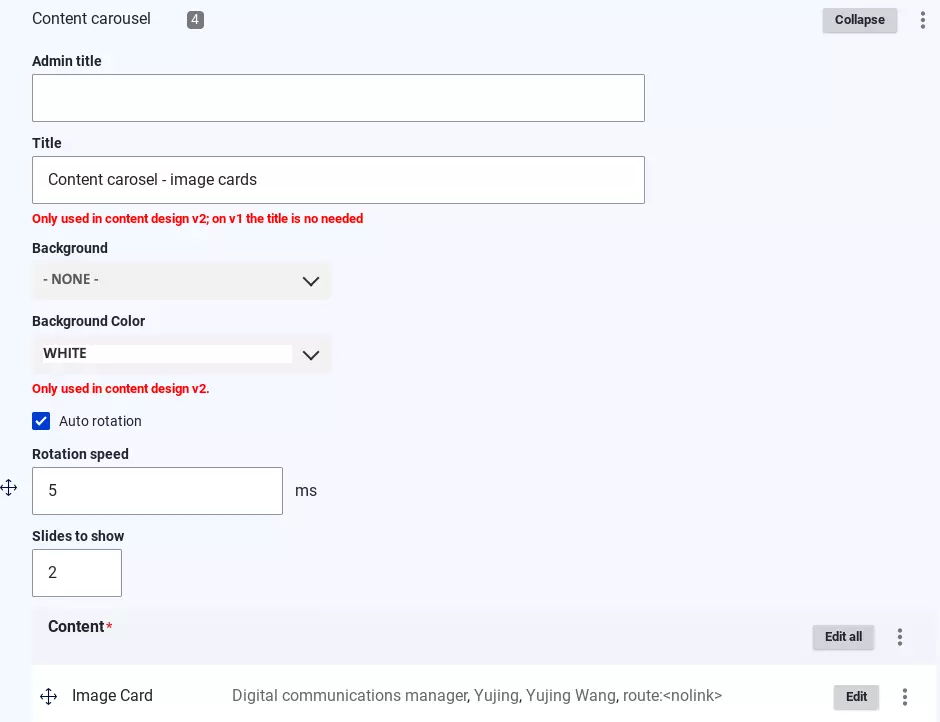
You can add a title to each content carousel block. (This is optional; you can skip it and add custom text if you prefer a different style for the title instead of using the default one.)
The background color is also customizable to match your preferences.
Enable the "Auto Rotation" option to activate the slider functionality.
Additionally, you can adjust the rotation speed and specify the number of slides to display initially.
Examples:
Content carosel - content push

Content carosel - image cards

Digital communications manager
Yujing Wang

Alan Riou
Digital communications manager

Laetitia Coupe
IT project manager

Coralie Gakpe
IT project manager
