

This procedure guides you through building a compelling Hero banner carousel that creates a strong first impression. For best results, it is recommended to use this component as the very first element of your homepage to immediately capture user attention.
Access and edit the Hero Carousel
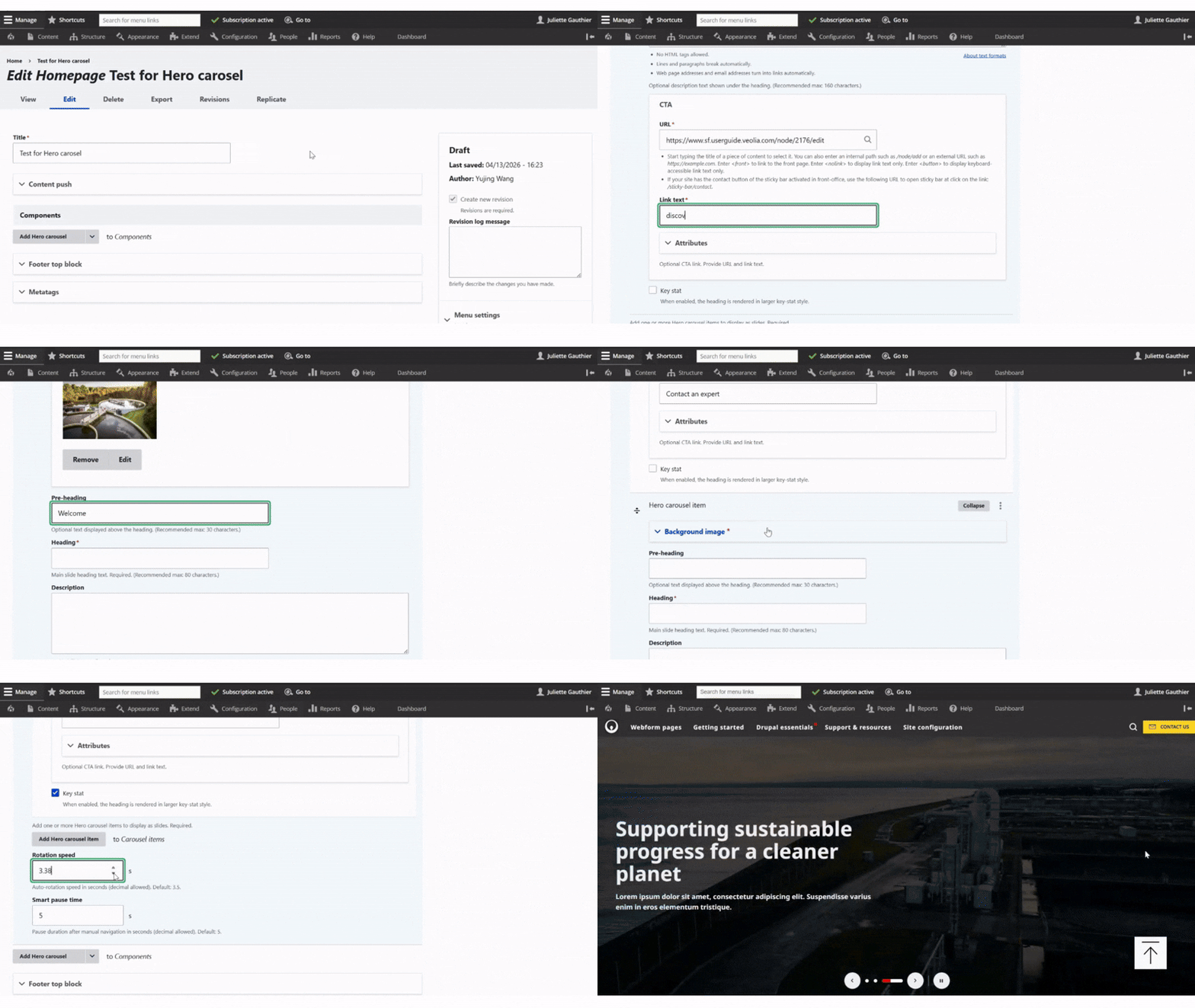
First, open the page editor and click “Add Hero Carousel”.
Next, choose a background image. Note that a dark overlay filter is automatically applied on the frontend.
Then, optionally add a pre-heading, which will appear as a small label above the main title. Enter the heading, which is the main title of the slide, and add a description to provide additional context.
You can also add a CTA button to collect data. Simply enter the button text and the URL it should link to.
Below, you will find a Key Stat option. When enabled, the heading is displayed in a different style (as shown in slide 3 of the example).
To add another slide, click “Add Hero Carousel Item” and configure it in the same way. After that, set the rotation speed and the smart pause time.
Finally, click Save to apply your changes.

Empowering sustainable solutions for a greener future
Lorem ipsum dolor sit amet, consectetur adipiscing elit. Suspendisse varius enim in eros elementum tristique. Duis cursus, mi quis viverra ornare, eros dolor interdum nulla, ut commodo diam libero vitae erat.
Discover more
Enabling green solutions for a more sustainable world
Lorem ipsum dolor sit amet, consectetur adipiscing elit. Suspendisse varius enim in eros elementum tristique. Duis cursus, mi quis viverra ornare, eros dolor interdum nulla, ut commodo diam libero vitae erat.
Contact us
Supporting sustainable progress for a cleaner planet
Lorem ipsum dolor sit amet, consectetur adipiscing elit. Suspendisse varius enim in eros elementum tristique. Duis cursus, mi quis viverra ornare, eros dolor interdum nulla, ut commodo diam libero vitae erat.
Find our office