

Preview

Information architecture
Allows to display list of links to internal/external pages or documents.
Design
Links media can use any of the Veolia colors.
Links media can be added to a text paragraph or media paragraph. Media has alignment and width option when embed to a text paragraph
Typical usage and example
To be used for: Block with list of related links
See an example on https://www.veolia.co.uk/solutions/tidworth-business-water
How to create it
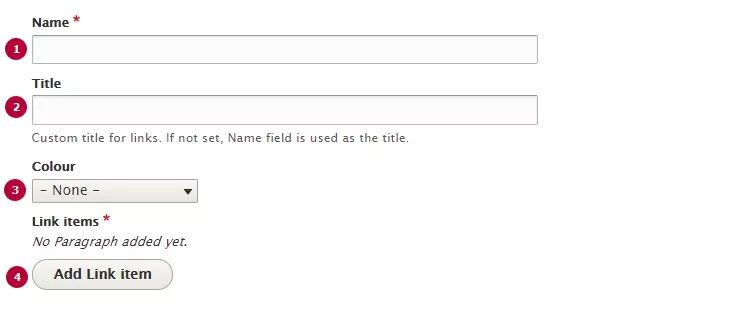
| Field | Description |
|---|---|
| 1 - Name | Used in the backoffice. If no title isn't set, Name will be displayed as media's title |
| 2 - Title | Custom title for the links block |
| 3 - Colour | Chose a background color for links media |
| 4 - Add link item | Add one new link item to the media |
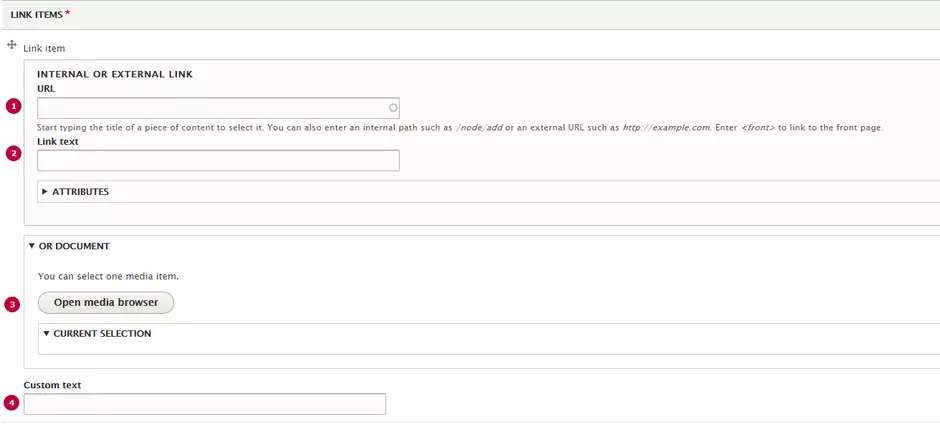
| Field | Description |
|---|---|
| 1 - URL | Link to a page. Can be external or internal |
| 2 - Title | Label for a link |
| 3 - Document | Add link to a related Document media |
| 4 - Custom text | Text label without link |