

Creating a taxonomy term
- Go to Structure > Taxonomy
- Chose the taxonomy where you want to add a term and click List terms
- Click button Add term, then fill out the appropriate fields
Name: term used both in back office for association and in front office for display in filters and navigation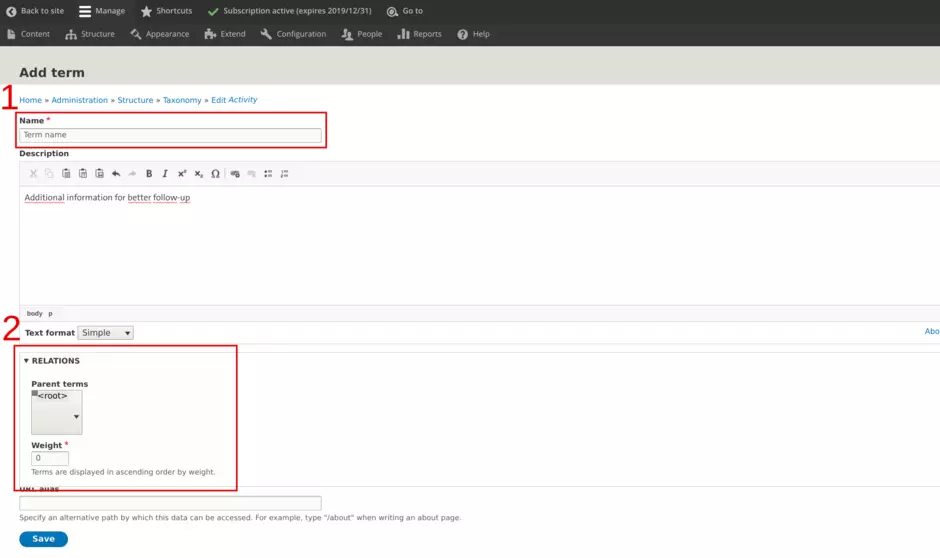
Relations: here is done building of structure in the taxonomy. Please refer to the dedicated zone below. - Click Save
Structuring a taxonomy
As taxonomy is about classifying things into groups within a larger system according to their similarities and differences, Drupal brings capacity to structure taxonomy terms.
Structuring of terms is done with two dimensions:
1. hierachy position
2. order position
1. Hierarchy position
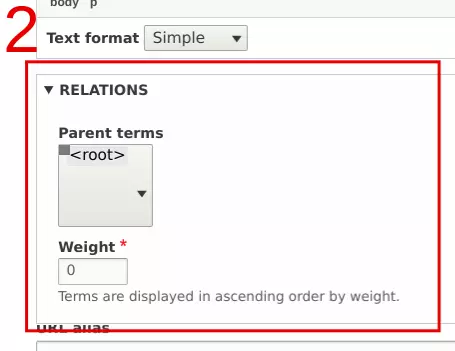
For a term, building hierachy is about chosing the parent term it is associated with.
It can be done selecting the appropriate term within the parent terms scrollable menu.
<root> if the reference level
Warning
Only 'Market' and 'Locations' taxonomies are allowed to enable more than 1 row of terms.
(limit is set to 3 rows).
Pay attention that system won't refuse creation, but front office won't display.
2. Order position
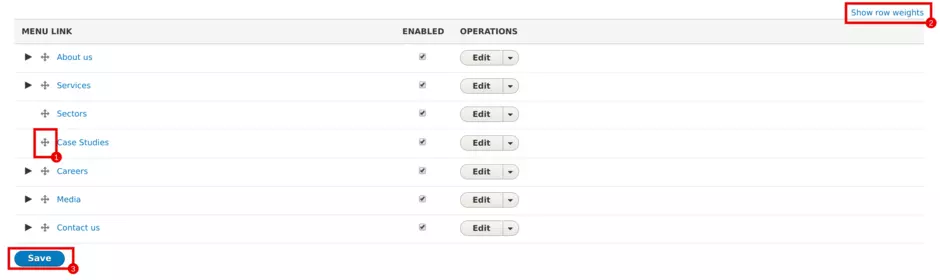
Interface brings you three different ways of managing order for terms
| Field | Description |
|---|---|
| 1 - Drag & drop | The easiest way. All you have to do is to drag and drop terms above and below others to set up the proper order |
| 2 - Showing row weights | All weights are enable on the page, bringing the capacity of setting them up |
| Not shown on screenshot | When editing a term, adjust weight with appropiate field available at the bottom of the page |
Once action is done,
CLICK ON THE SAVE BUTTON AT THE BOTTOM OF THE PAGE
(3. on the screenshot above)
About weights:
Drupal uses a logic of weight to build an order of appearance among a range of terms. Weight is a number positive or negative. The lower the number is the higher level of prority the term will receive, the higher the number is the lower level of priority the term will receive.
Example:
| List of terms | |||||
| Name | item1 | item2 | item3 | item4 | item5 |
| Weight | -43 | 10 | 95 | -44 | -20 |
| Front-end order display | |||||
| Order | 1st | 2nd | 3rd | 4th | 5th |
| Item | item4 | item1 | item5 | item2 | item3 |
Hint!
When ordering items, use the method you are the most comfortable with
Translating a taxonomy
All about translations is available in the dedicated section of the Translations page